
OpenAI is no longer just a tool for testing prompts or writing quick emails. It has become a practical business technology that can support customer service, marketing, sales, operations, software development, HR, analytics, and internal knowledge management. For many companies, the real question is not “Should we use AI?” but “Where should we use it first?”
In this article, I will explain the Top 10 Use Cases for OpenAI in Business Today in a simple, practical, and business-focused way. I will also cover benefits, risks, examples, and implementation steps so decision-makers can move from AI curiosity to real business value.
Research from McKinsey shows that regular AI use across at least one business function continues to rise, while many companies are still learning how to scale AI beyond pilots [5]. OpenAI also reports that enterprise use is becoming more deeply embedded in workflows, products, and internal systems [3]. That means businesses that build clear, governed, and measurable AI use cases now can gain a strong operational advantage.
Why OpenAI Matters for Modern Business
OpenAI matters because it gives businesses access to advanced language, reasoning, multimodal, and automation capabilities without requiring every company to build a foundation model from scratch. Teams can use Chat GPT for Business, ChatGPT Enterprise, and the OpenAI API to create tools, automate workflows, analyze information, and support employees.
OpenAI Helps Businesses Create, Code, and Innovate
OpenAI’s business platform is designed to help companies create content, write and review code, build AI applications, and automate business operations [1]. This makes it useful for both non-technical teams and technical teams. A marketing team may use it to draft campaign ideas, while a product team may use it to summarize user feedback and create feature briefs.
Open AI Supports Everyday Workflows
The biggest value often comes from simple repeatable workflows. Employees can use OpenAI to draft emails, summarize meetings, research competitors, prepare reports, clean data, generate training material, and answer internal questions. OpenAI’s workplace usage research shows writing, research, programming, and analysis are among the dominant early workplace use patterns [9].
OpenAI Can Be Used Securely with Governance
Business adoption depends on trust. OpenAI states that, by default, it does not use data from ChatGPT Enterprise, ChatGPT Business, ChatGPT Edu, ChatGPT for Healthcare, ChatGPT for Teachers, or its API platform to train or improve models [2]. Companies should still apply their own security policies, access controls, approval flows, and human review processes before scaling AI.
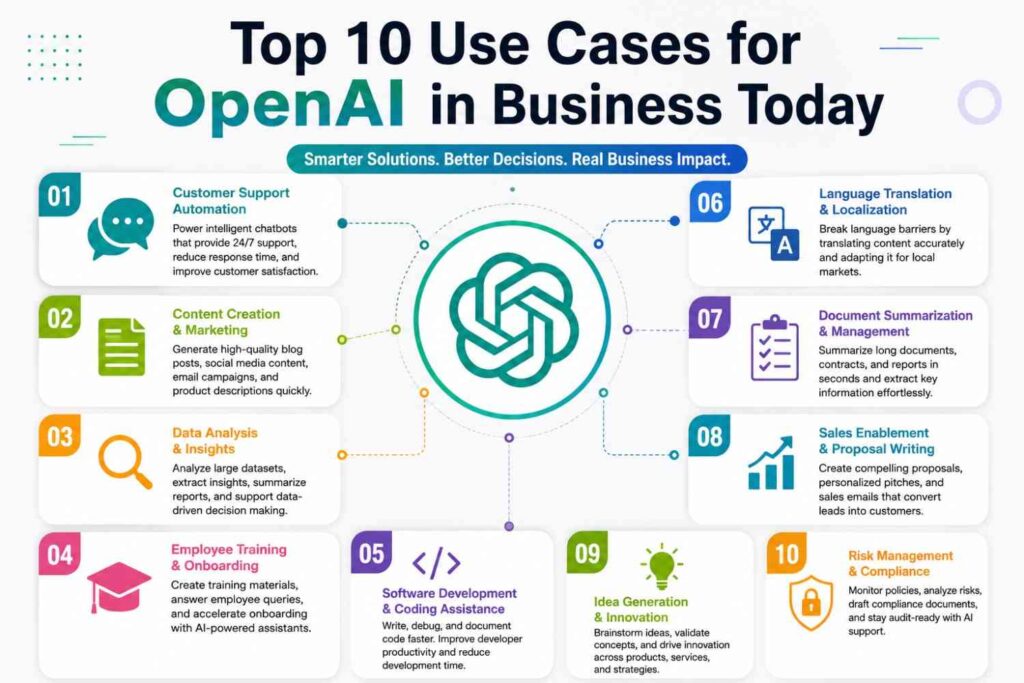
Top 10 Use Cases for OpenAI in Business Today
The Top 10 Use Cases for OpenAI in Business Today are not limited to one department. They apply across customer-facing work, internal operations, technical teams, and leadership decision-making. The best use cases are usually high-volume, repetitive, knowledge-heavy, or time-consuming tasks where AI can support humans rather than replace judgment.
1. Customer Support Automation
OpenAI can help customer support teams answer common questions, summarize tickets, suggest responses, classify issues, and route customers to the right department. AI can also help agents understand customer history faster by summarizing long conversations.
Example use cases include:
- Drafting support replies
- Summarizing live chat history
- Creating help center articles
- Categorizing tickets by urgency
- Suggesting next-best actions
This improves response speed and consistency, but businesses should keep human review for refunds, cancellations, complaints, legal issues, and sensitive customer cases.
2. Sales Enablement and Lead Qualification
Sales teams can use OpenAI to research prospects, personalize outreach, summarize CRM notes, prepare discovery questions, and identify customer pain points. Instead of writing every message manually, sales reps can generate a first draft and then personalize it with human context.
A practical workflow may look like this:
| Sales Task | OpenAI Support | Business Benefit |
|---|---|---|
| Prospect research | Summarizes company information | Saves preparation time |
| Cold email writing | Drafts personalized outreach | Improves speed |
| CRM note review | Extracts key deal signals | Better follow-up |
| Objection handling | Suggests response angles | Stronger conversations |
3. Marketing and Content Creation
Marketing is one of the most common business use cases for generative AI. OpenAI can help create blog outlines, ad copy, landing page drafts, product descriptions, email campaigns, social posts, and SEO briefs. It can also repurpose long-form content into short-form assets.
The key is to use AI as a creative assistant, not as an unchecked publishing machine. Marketers should verify facts, add brand voice, review claims, and ensure content follows SEO, AEO, and GEO best practices.
OpenAI Use Cases for Internal Productivity
Internal productivity is where OpenAI can deliver fast wins. Many teams lose hours each week on writing, searching, summarizing, formatting, and reporting. OpenAI can reduce this friction by acting as a smart assistant across daily work.
4. Document Summarization and Knowledge Management
Businesses create large volumes of documents: policies, contracts, training manuals, meeting notes, proposals, reports, and product documentation. OpenAI can summarize long documents, extract action items, compare versions, and answer questions based on approved internal knowledge.
This is especially useful for:
- Legal teams reviewing contracts
- HR teams explaining policies
- Sales teams accessing product information
- Customer support teams searching help documentation
- Executives reviewing long reports
For sensitive documents, companies should use approved business or enterprise environments with proper permissions and data controls.
5. HR, Recruitment, and Employee Training
HR teams can use OpenAI to draft job descriptions, screen role requirements, create onboarding checklists, summarize employee feedback, and build training content. It can also help managers write clearer performance review drafts.
However, hiring and performance decisions need human oversight. AI should not be used as the sole decision-maker for employment outcomes. Businesses must check for bias, compliance, and fairness before using AI in HR workflows.
6. Meeting Notes, Reports, and Executive Briefings
OpenAI can turn messy meeting notes into structured summaries, action lists, project updates, and leadership briefs. Teams can also use it to convert technical reports into executive-friendly language.
A useful prompt framework is:
- Provide meeting notes or transcript.
- Ask for decisions, blockers, owners, and deadlines.
- Request a short executive summary.
- Ask for risks and next steps.
- Review and edit before sharing.
This use case is simple, low-cost, and highly practical for almost every department.
OpenAI Use Cases for Technical and Data Teams
Technical teams can use OpenAI for coding, debugging, testing, data analysis, documentation, and product development. These use cases can save time, but they require strong review because technical mistakes can create security, privacy, or reliability problems.
7. Software Development and Code Review
OpenAI can support developers by generating code snippets, explaining errors, writing test cases, reviewing pull requests, and creating technical documentation. OpenAI’s business platform includes Codex-related capabilities for software development and code review [1].
Common developer use cases include:
- Explaining legacy code
- Generating unit tests
- Refactoring code
- Creating API documentation
- Debugging error messages
- Reviewing logic and edge cases
Developers should still review AI-generated code for security, performance, licensing, and production readiness.
8. Data Analysis and Business Intelligence
OpenAI can help teams analyze spreadsheets, summarize trends, explain dashboards, generate SQL queries, clean datasets, and create plain-English insights from business data. This is useful for finance, operations, sales, marketing, and product teams.
For example, a business analyst can ask OpenAI to identify sales trends, summarize customer segments, or explain why conversion rates changed. OpenAI can also help non-technical employees understand data without waiting for a data team.
9. Product Development and Customer Research
Product teams can use OpenAI to analyze customer reviews, summarize user interviews, cluster feature requests, draft product requirement documents, and compare competitor features. This helps teams move faster from raw feedback to product decisions.
A practical product workflow:
| Product Activity | OpenAI Use | Output |
|---|---|---|
| User interview review | Summarizes themes | Research insights |
| Feedback analysis | Groups complaints and requests | Feature priorities |
| PRD drafting | Creates structured requirements | Product brief |
| Competitor research | Summarizes market positioning | Strategy notes |
OpenAI Use Cases for Automation and Decision Support
The next stage of business AI is not only generating content. It is about building AI-assisted workflows that can take actions across tools with permissions, guardrails, and human approval. This is where AI agents become important.
10. AI Agents for Workflow Automation
OpenAI describes agents as systems that can independently accomplish tasks on a user’s behalf [4]. In business, agents can help with multi-step workflows such as updating CRM records, preparing weekly reports, routing customer issues, checking inventory, generating finance summaries, or coordinating procurement steps.
OpenAI’s agent guidance explains that agents can use tools for data retrieval, actions, and orchestration [4]. This means an AI system can retrieve information, reason through a task, and interact with business systems when allowed.
Decision Support for Leaders
Executives can use OpenAI to summarize market research, compare strategic options, create scenario plans, and prepare board-level summaries. It can also help leaders review risks, opportunities, and trade-offs before making decisions.
AI should support decision-making, not replace leadership judgment. For high-impact decisions, leaders should verify sources, check assumptions, consult experts, and use AI output as one input among several.
Compliance, Risk, and Policy Support
OpenAI can help compliance teams summarize regulations, draft internal policy documents, review training content, and create checklists. It can also help teams compare internal procedures against policy requirements.
However, compliance work must be verified by qualified professionals. AI may misunderstand legal nuance, miss recent regulatory updates, or produce confident but incorrect summaries. Human review is essential.
How to Implement OpenAI in Business Successfully
The Top 10 Use Cases for OpenAI in Business Today can create value only when they are implemented with a clear plan. Many companies fail with AI because they start with hype instead of business problems. A stronger approach is to start small, measure outcomes, and scale what works.
Start with High-Value, Low-Risk Use Cases
Start with tasks that are repetitive, time-consuming, and easy to review. Examples include meeting summaries, email drafts, internal FAQs, content briefs, ticket categorization, and report formatting. OpenAI’s guide for identifying use cases recommends looking for repetitive low-value tasks, skill bottlenecks, and ambiguity-heavy work [3].
Create a Simple AI Governance Framework
Every business should define:
- Who can use OpenAI tools
- What data can and cannot be entered
- Which outputs need human approval
- How prompts and outputs are reviewed
- How success will be measured
- How risks will be escalated
Governance does not need to slow innovation. It helps teams use AI safely and consistently.
Measure ROI with Clear KPIs
Do not measure AI success only by usage. Measure business outcomes. Good KPIs include time saved, response time, ticket resolution rate, content production speed, sales follow-up rate, cost reduction, employee satisfaction, and error reduction.
| Use Case | KPI to Track | Success Signal |
|---|---|---|
| Customer support | First response time | Faster replies |
| Sales outreach | Reply rate | Better engagement |
| Marketing content | Production time | Faster campaigns |
| Data analysis | Report turnaround | Faster insights |
| HR onboarding | Completion time | Smoother training |
Frequently Asked Questions
What are the best OpenAI use cases for small businesses?
The best use cases for small businesses include customer support replies, social media content, email marketing, proposal writing, sales outreach, meeting summaries, and simple data analysis. These tasks are common, easy to review, and do not usually require complex technical integration.
Can OpenAI automate customer service?
Yes, OpenAI can help automate parts of customer service such as FAQs, ticket summaries, response suggestions, and issue classification. However, businesses should keep human agents involved for complaints, refunds, legal concerns, sensitive data, and complex customer issues.
Is OpenAI useful for marketing teams?
Yes, OpenAI is very useful for marketing teams. It can help with blog outlines, SEO briefs, ad copy, email campaigns, product descriptions, social captions, landing page drafts, and content repurposing. Marketers should still review facts, tone, claims, and brand accuracy before publishing.
How can OpenAI help sales teams?
OpenAI can help sales teams research prospects, personalize outreach, summarize CRM notes, prepare call scripts, handle objections, and draft follow-up emails. It saves time and helps reps focus more on relationship building and deal strategy.
Can OpenAI be used for data analysis?
Yes, OpenAI can assist with data analysis by summarizing spreadsheets, explaining trends, generating SQL queries, cleaning data, and turning dashboards into plain-English insights. Sensitive or regulated data should only be used in approved business environments with proper controls.
What are AI agents in business?
AI agents are systems that can complete tasks on behalf of users with some level of independence. In business, agents can help automate workflows like report generation, customer ticket routing, CRM updates, procurement steps, and internal knowledge retrieval.
Is OpenAI safe for enterprise use?
OpenAI offers business and enterprise products with privacy, security, admin controls, and compliance features [2]. Still, safety depends on how a company configures access, manages data, trains employees, reviews outputs, and applies governance.
What is the biggest risk of using OpenAI in business?
The biggest risks include inaccurate outputs, data leakage, overreliance, bias, poor governance, and lack of human review. Companies should use clear policies, verified sources, role-based access, and approval workflows before using AI for high-impact decisions.
Conclusion
The Top 10 Use Cases for OpenAI in Business Today show that AI can support nearly every department, from customer service and sales to marketing, HR, software development, analytics, product research, compliance, and workflow automation. The strongest results come when companies start with practical problems, choose measurable use cases, train employees, and apply clear governance.
OpenAI is not a magic replacement for teams. It is a productivity layer that helps people work faster, think more clearly, and reduce repetitive work. Businesses that combine AI tools with human expertise, verified data, and responsible processes will be better positioned to compete in the next phase of digital transformation.