
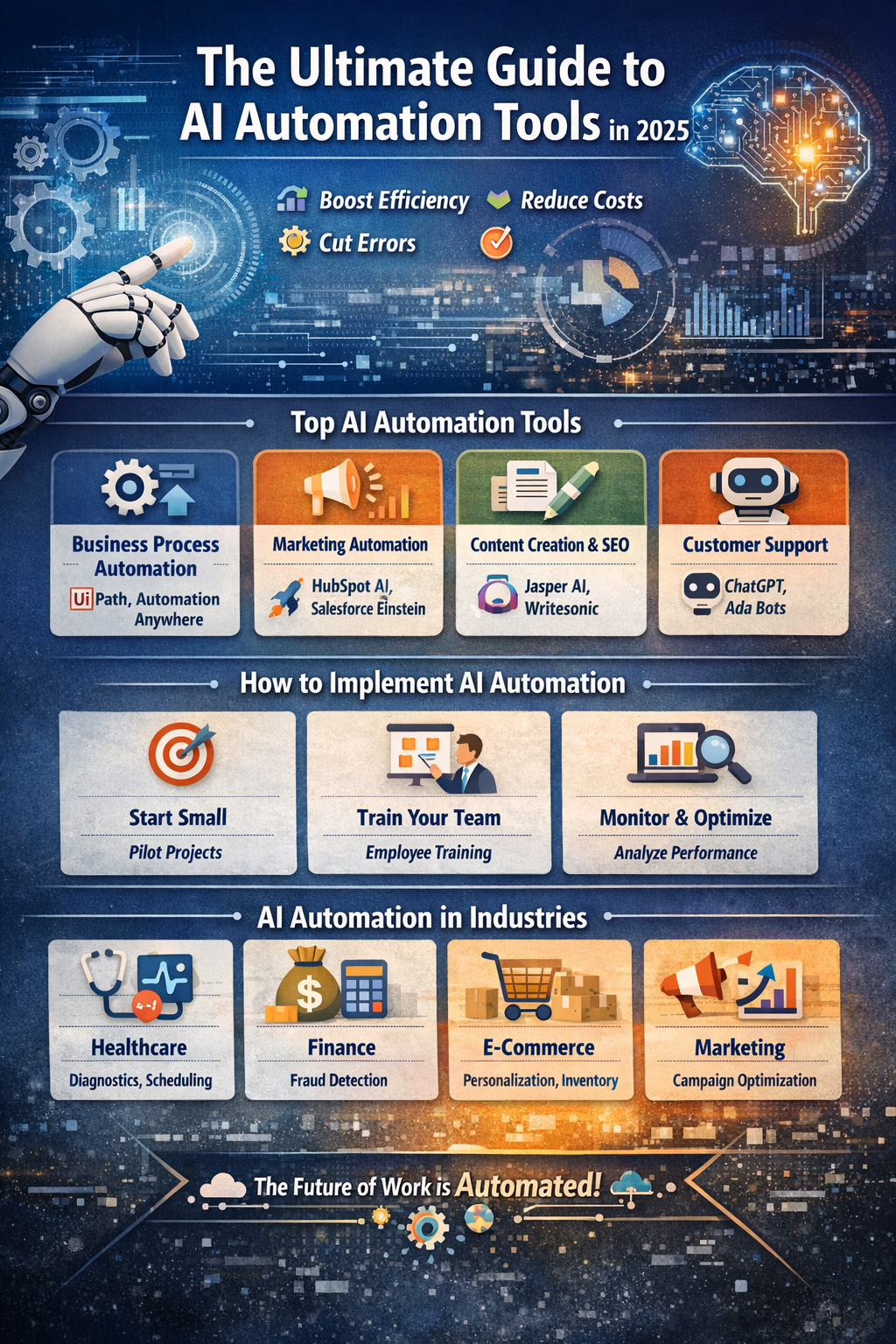
What Are AI Automation Tools?
AI automation tools are software solutions that leverage artificial intelligence (AI) to automate repetitive, time-consuming tasks, making workflows more efficient, accurate, and scalable. Unlike traditional automation tools, which follow strict rule-based instructions, AI automation tools use machine learning (ML), natural language processing (NLP), and predictive analytics to make decisions, learn from data, and adapt over time.
For example, in business environments, AI automation tools can handle tasks such as responding to customer queries, generating reports, managing inventory, or even analyzing complex datasets to provide actionable insights. These tools not only save time but also reduce human error and improve overall productivity.
Key Features of AI Automation Tools
AI automation tools come with a variety of advanced features that set them apart from traditional software. Some of the most important features include:
- Machine Learning Capabilities: Tools can learn from historical data to improve processes over time.
- Natural Language Processing (NLP): Enables understanding and generation of human language for tasks like chatbots and automated content creation.
- Predictive Analytics: AI can forecast outcomes based on historical trends, helping businesses make data-driven decisions.
- Workflow Automation: Automates repetitive processes, freeing employees to focus on higher-value tasks.
How AI Automation Tools Work
AI automation tools generally follow a three-step workflow:
- Data Input and Learning: The AI system gathers data from various sources and uses algorithms to identify patterns and insights.
- Task Automation: The AI executes tasks automatically, such as sending emails, scheduling appointments, or generating reports.
- Real-Time Decision Making: The AI can adapt and make decisions in real time, responding to new data or changing conditions.
By integrating these tools, organizations can streamline operations, reduce operational costs, and accelerate productivity, making AI automation a critical part of modern business strategy.
Benefits of Using AI Automation Tools
AI automation tools provide transformative advantages across industries, helping businesses and individuals save time, reduce errors, and make smarter decisions. These benefits extend beyond simple task automation—they enhance productivity, innovation, and overall operational efficiency.
1. Increased Efficiency and Productivity
AI automation tools streamline repetitive tasks such as data entry, email responses, report generation, and scheduling. By automating these processes, employees can focus on strategic and creative tasks, leading to higher productivity. According to a McKinsey report, companies that adopt AI-powered automation see up to a 20-30% increase in productivity within the first year.
2. Reducing Human Error
Manual processes are prone to errors, especially when dealing with large datasets or repetitive tasks. AI automation tools eliminate common human mistakes by following algorithms and learning from data, ensuring more accurate outcomes. For instance, in finance, AI tools can reduce errors in transaction processing or fraud detection, while in healthcare, they can assist in accurate patient diagnosis and record-keeping.
3. Cost Savings in Business Operations
Investing in AI automation tools can reduce operational costs by minimizing the need for manual labor and optimizing workflows. Businesses can allocate resources more effectively, scale operations without proportional increases in staffing costs, and improve return on investment (ROI). For example, a study by Deloitte found that organizations using AI-driven automation tools reduced operational costs by up to 40% in certain departments.
4. AI Automation Tools for Small vs. Large Businesses
The benefits of AI automation tools apply to businesses of all sizes, but the implementation may vary:
- Small Businesses: Can use affordable AI tools to automate social media posts, customer follow-ups, or email marketing campaigns. Tools like Jasper AI or HubSpot AI offer easy-to-use solutions for smaller teams.
- Large Enterprises: Require scalable AI automation platforms such as UiPath or Automation Anywhere for complex workflows across multiple departments, including finance, HR, and supply chain management.
5. Case Studies of Successful AI Automation
Case Study 1 – Marketing Automation:
A leading e-commerce company implemented AI marketing automation tools to personalize email campaigns and predict customer behavior. Within six months, conversion rates increased by 25%, and customer engagement improved significantly.
Case Study 2 – Customer Support Automation:
A global telecom provider deployed AI-powered chatbots to handle common customer queries. The result was a 40% reduction in response time and a 30% decrease in operational costs, while customer satisfaction scores improved.
Case Study 3 – Financial Services:
A multinational bank used AI automation tools for transaction monitoring and fraud detection. The AI system flagged suspicious activity with 95% accuracy, preventing millions in potential losses.
Key Takeaways:
AI automation tools don’t just save time—they improve accuracy, enhance efficiency, and reduce costs. They are adaptable for businesses of all sizes and can provide measurable ROI when implemented strategically.
Top AI Automation Tools in 2025
The AI automation tools landscape is constantly evolving, with new solutions emerging to help businesses streamline operations, enhance productivity, and leverage AI-driven insights. Below is a comprehensive guide to the best AI automation tools categorized by their primary applications.
AI Tools for Business Process Automation (BPA)
Business Process Automation tools focus on automating repetitive workflows, integrating systems, and ensuring data consistency across departments.
- UiPath: A leading BPA tool that offers robotic process automation (RPA) to handle tasks like invoice processing, employee onboarding, and data migration.
- Automation Anywhere: Provides cloud-based RPA solutions suitable for enterprises, automating processes in finance, HR, and IT operations.
- Blue Prism: Known for its secure, scalable RPA platform that supports complex enterprise workflows.
Use Case: A logistics company reduced manual order processing time by 60% using UiPath, allowing employees to focus on customer service and strategic planning.
AI Tools for Marketing Automation
Marketing automation AI tools use predictive analytics and AI algorithms to optimize campaigns, personalize customer experiences, and improve engagement.
- HubSpot AI: Automates email marketing, social media posting, and lead nurturing with AI-driven insights.
- Marketo: Offers AI-powered personalization and marketing analytics for enterprise campaigns.
- Salesforce Einstein: Integrates AI into CRM workflows, predicting customer behavior and suggesting next steps.
Fact: According to Salesforce, companies using AI in marketing automation see a 50% improvement in lead conversion rates on average.
AI Tools for Content Creation & SEO
These AI automation tools help content creators, marketers, and SEO specialists generate high-quality content, optimize it for search engines, and scale content production.
- Jasper AI: Generates blog posts, social media content, and ad copy using AI-driven suggestions.
- Writesonic: Assists in AI-powered content creation with templates for blogs, emails, and landing pages.
- Copy.ai: Provides AI tools for writing, rephrasing, and brainstorming creative content.
Example: A SaaS company using Jasper AI for content creation increased its blog output from 2 posts per week to 10 posts per week without adding extra staff.
AI Tools for Customer Support
AI automation tools in customer support help businesses reduce response times, improve customer satisfaction, and handle high volumes of queries.
- ChatGPT (OpenAI): Provides conversational AI for chatbots, virtual assistants, and customer support automation.
- Ada: Automates customer interactions using AI-driven chatbots, with integration for multiple channels.
- Intercom AI: Offers AI-powered messaging and support solutions that predict customer needs and provide instant responses.
Case Study: A telecom company deployed ChatGPT-based chatbots, reducing human agent workload by 35% and improving average response time from 12 minutes to 3 minutes.
AI Tools for Data Analytics & Forecasting
AI-powered analytics tools leverage machine learning to analyze large datasets, provide predictive insights, and automate reporting.
- Tableau AI: Uses AI to discover trends, visualize data, and provide actionable insights.
- Power BI with AI: Offers AI-driven analytics and predictive modeling integrated with Microsoft ecosystems.
- IBM Watson Analytics: Provides cognitive analytics, predictive modeling, and automated data visualization.
Fact: Organizations using AI-driven analytics report up to a 40% improvement in decision-making speed according to Deloitte research.
Table: Summary of Top AI Automation Tools by Category
| Category | Tool | Key Feature | Example Use Case |
|---|---|---|---|
| Business Process Automation | UiPath | RPA workflows | Invoice processing, HR onboarding |
| Business Process Automation | Automation Anywhere | Cloud-based RPA | Finance & IT automation |
| Marketing Automation | HubSpot AI | Lead nurturing & social media automation | Email campaigns & engagement |
| Marketing Automation | Salesforce Einstein | Predictive CRM | Customer behavior prediction |
| Content Creation & SEO | Jasper AI | AI content generation | Blog & social media posts |
| Content Creation & SEO | Writesonic | Templates for content | Email marketing & landing pages |
| Customer Support | ChatGPT | Conversational AI | Chatbots & virtual assistants |
| Customer Support | Ada | Multi-channel AI bots | Customer query automation |
| Data Analytics & Forecasting | Tableau AI | Predictive insights | Trend analysis & reporting |
| Data Analytics & Forecasting | Power BI with AI | Data visualization & modeling | Sales forecasting & dashboards |
Key Takeaways:
These AI automation tools cater to different business needs—from automating repetitive tasks and marketing campaigns to enhancing customer support and analyzing large datasets. Selecting the right tool depends on your industry, workflow requirements, and business scale.
How to Choose the Right AI Automation Tool
Choosing the right AI automation tool can be challenging given the variety of options available in 2025. Selecting the wrong tool can result in wasted time, resources, and ineffective automation. To make an informed decision, businesses should consider a combination of business needs, technical capabilities, budget, and scalability.
1. Identify Your Business Needs and Goals
Before evaluating any tool, clearly define the tasks you want to automate and the outcomes you want to achieve.
- Are you looking to automate repetitive office tasks, such as data entry or report generation?
- Do you want to improve customer engagement through chatbots and AI-driven marketing campaigns?
- Are you aiming to leverage AI analytics for strategic decision-making?
Tip: Prioritize tools that directly address your business pain points. For example, a small e-commerce business may benefit most from AI marketing automation, while a large enterprise may need RPA solutions for complex workflows.
2. Evaluate Pricing and ROI
AI automation tools vary in price, from free or low-cost software to enterprise-grade platforms with high subscription fees.
- Small Businesses: Can start with affordable tools like Jasper AI, Writesonic, or HubSpot AI, which often have tiered pricing plans.
- Large Enterprises: Might need enterprise-level solutions like UiPath or Automation Anywhere, which offer scalability but require higher investment.
Tip: Calculate potential ROI by comparing time saved, operational efficiency gains, and cost reduction against the tool’s price. A tool that saves hundreds of labor hours annually may justify a higher subscription cost.
3. Assess Ease of Use and Integration
A tool’s effectiveness depends on how well it integrates with your existing systems and how easy it is for your team to adopt.
- Check if the AI tool integrates with current software like CRM, ERP, or marketing platforms.
- Ensure the interface is user-friendly to minimize the learning curve.
- Look for pre-built templates or workflows that can accelerate implementation.
Fact: Research shows that 40% of AI automation adoption fails due to lack of integration with existing systems or employee resistance. Choosing a user-friendly, compatible tool reduces this risk.
4. Questions to Ask Before Selecting an AI Automation Tool
When evaluating AI automation tools, ask the following questions:
- Does it scale as my business grows?
- Can it handle my specific workflow requirements?
- Does it offer AI capabilities like machine learning, NLP, or predictive analytics?
- How secure is data handling and storage?
- What level of support and training is provided by the vendor?
5. Avoiding Common Mistakes
- Overcomplicating Workflows: Avoid selecting tools with unnecessary features that complicate processes.
- Ignoring Employee Training: A tool is only effective if your team knows how to use it properly.
- Neglecting Data Privacy: Ensure AI automation tools comply with data protection regulations like GDPR.
- Rushing Implementation: Start small with pilot projects before full-scale adoption.
Key Takeaways:
Selecting the right AI automation tool requires careful evaluation of your business needs, budget, integration capabilities, and team readiness. By asking the right questions and avoiding common mistakes, organizations can maximize the benefits of AI automation and ensure long-term success.
How to Implement AI Automation Tools Effectively
Implementing AI automation tools successfully requires careful planning, clear objectives, and ongoing monitoring. While AI can significantly enhance productivity, improper implementation can lead to inefficiencies and wasted resources. The following steps and best practices provide a roadmap for effective AI adoption.
1. Step-by-Step Guide for Implementation
- Define Clear Goals:
- Identify specific processes to automate.
- Set measurable objectives, such as reducing manual data entry by 50% or improving customer response time.
- Select the Right Tool:
- Refer to your previous evaluation of AI automation tools.
- Ensure the tool aligns with your goals, workflow, and technical capabilities.
- Start with a Pilot Project:
- Test the tool on a small, non-critical process.
- Gather feedback from users and identify potential challenges before full-scale deployment.
- Integrate with Existing Systems:
- Ensure seamless integration with CRM, ERP, or marketing platforms.
- Use APIs or built-in connectors provided by the tool for smooth workflow automation.
- Train Your Team:
- Provide hands-on training to employees on how to use the AI tool effectively.
- Share best practices and create documentation for reference.
- Monitor and Optimize:
- Track performance metrics such as time saved, error reduction, and productivity gains.
- Continuously refine workflows and adjust AI parameters for optimal results.
2. Best Practices for AI Automation Adoption
- Start Small: Begin with tasks that have a high impact but low complexity. This approach builds confidence and demonstrates ROI early.
- Focus on High-Value Tasks: Automate repetitive, time-consuming processes so employees can focus on strategic and creative work.
- Measure Performance: Establish KPIs (Key Performance Indicators) to track improvements in efficiency, cost reduction, and output quality.
- Encourage Collaboration: Involve teams from IT, operations, and management to ensure smooth adoption and alignment with business goals.
- Maintain Flexibility: Be prepared to iterate and optimize your AI workflows as you gather insights and feedback.
3. Common Implementation Challenges and Solutions
| Challenge | Solution |
|---|---|
| Employee resistance | Conduct training sessions and highlight time-saving benefits |
| Integration issues | Use AI tools with robust API support and pre-built connectors |
| Data quality problems | Clean and standardize data before feeding it into AI systems |
| Over-automation | Balance AI tasks with human oversight for critical decisions |
Case Study:
A retail company implemented AI automation tools for inventory management. By automating stock level tracking, order placement, and supplier communication, the company reduced stockouts by 35% and cut inventory management costs by 25% within six months. This success was attributed to careful planning, starting with a pilot project, and continuous monitoring of AI workflows.
Key Takeaways:
Effective implementation of AI automation tools requires planning, training, and monitoring. Starting small, focusing on high-value tasks, and continuously optimizing workflows ensures that AI delivers measurable benefits and sustainable productivity improvements.