
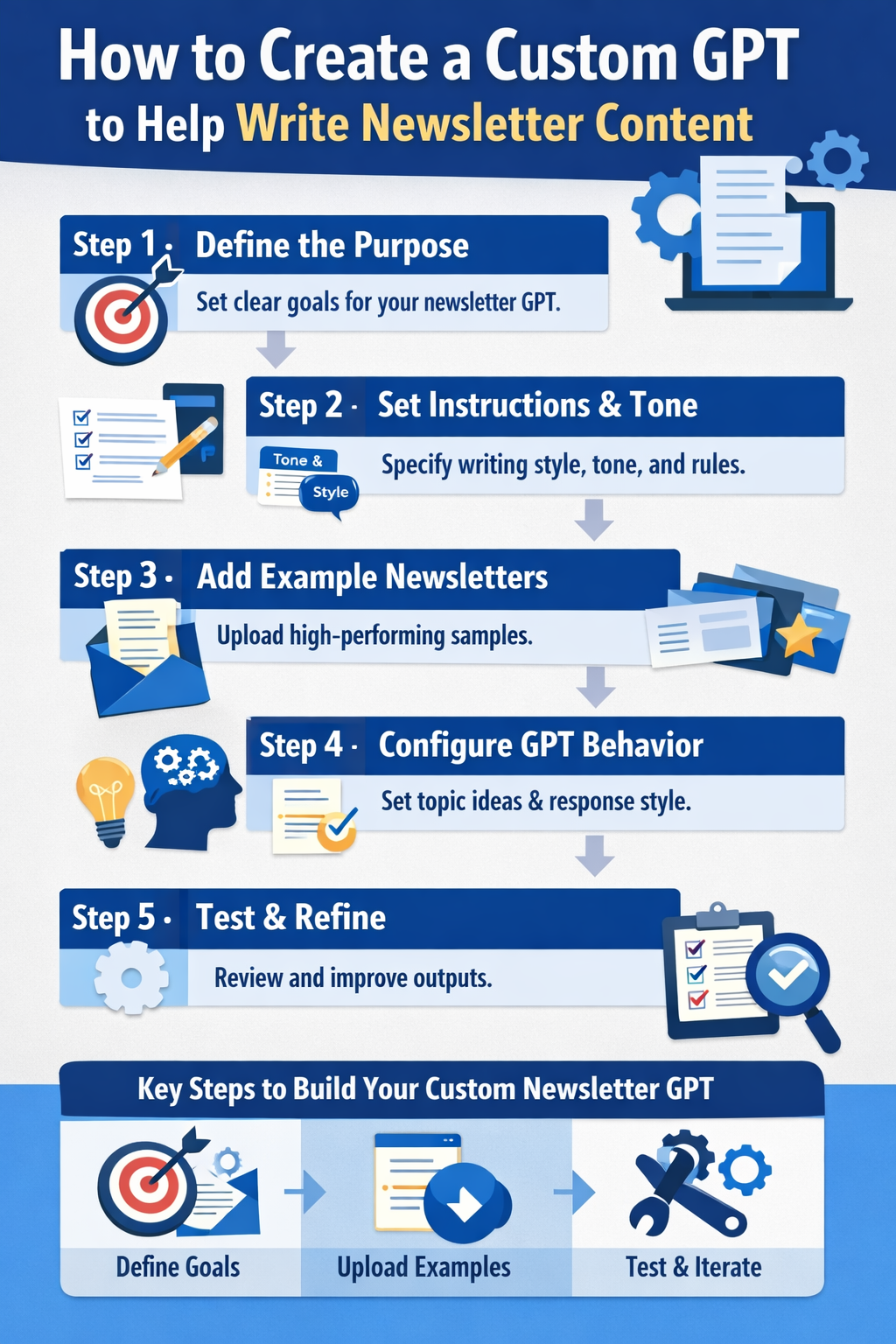
Introduction: Why You Should Create a Custom GPT to Help Write Newsletter Content
Creating a newsletter consistently is one of the hardest content marketing tasks. You need strong ideas, clear structure, engaging writing, and a consistent brand voice—every single week. This is exactly why more marketers, founders, and creators are choosing to create a custom GPT to help write newsletter content instead of relying on generic AI prompts or starting from scratch each time.
A custom GPT for newsletter writing is not just another AI tool. It is a personalized writing assistant trained specifically on your audience, your tone, your goals, and your newsletter format. Unlike standard ChatGPT conversations, a custom GPT follows fixed instructions, rules, and examples, which means the output improves over time and stays consistent.
According to recent content marketing studies, email newsletters still deliver one of the highest ROIs, with email marketing generating an average return of $36 for every $1 spent. Yet, many newsletters fail because of inconsistent publishing, weak storytelling, or unclear messaging. A well-built custom GPT directly solves these problems by acting as a repeatable, scalable system.
Why generic AI tools fall short for newsletters
Most people use AI like this:
- Open ChatGPT
- Type a quick prompt
- Get a decent but generic draft
- Rewrite large portions manually
This approach wastes time and leads to inconsistent quality. When you create a custom GPT to help write newsletters, you eliminate this friction by embedding your preferences directly into the AI.
A custom newsletter GPT can be trained to:
- Match your brand voice every time
- Follow your preferred newsletter structure
- Generate ideas aligned with your niche
- Write subject lines optimized for open rates
- Include CTAs in your exact style
Who this guide is for
This guide is written for:
- Newsletter creators building personal or paid newsletters
- Marketers managing weekly or monthly email campaigns
- SaaS and startup teams sending product and educational updates
- Agencies scaling newsletter production for multiple clients
You do not need coding skills. You do not need AI expertise. You just need a clear framework—which this article will give you step by step.
What you’ll learn in this guide
By the end of this article, you’ll understand:
- What it really means to create a custom GPT for newsletter writing
- Why a custom GPT outperforms generic AI prompts
- How to structure and train a newsletter-focused GPT
- Best practices to get high-quality, human-sounding results
Key takeaway:
A custom GPT is not about replacing human creativity. It’s about removing friction, saving time, and improving consistency so you can focus on strategy instead of blank pages.
What Does It Mean to Create a Custom GPT for Newsletter Writing?
To truly understand why this approach works, it’s important to clearly define what it means to create a custom GPT to help write newsletter content. Many people assume a custom GPT is highly technical or requires programming. In reality, it is a structured AI configuration that follows permanent instructions, tone rules, and examples tailored specifically to your newsletter.
A custom GPT for newsletter writing acts like a trained assistant who already understands:
- Who your audience is
- What your newsletter is about
- How your content should sound
- How each issue should be structured
Instead of prompting from scratch every time, you are working with an AI that already knows the job.
What Is a Custom GPT?
A custom GPT is a version of ChatGPT that you configure with:
- System-level instructions (how it should behave)
- Writing rules (tone, style, length, formatting)
- Examples (past newsletters or sample outputs)
- Constraints (what it should avoid)
Think of it as turning ChatGPT from a generalist into a specialist newsletter writer.
| Feature | Generic ChatGPT | Custom GPT for Newsletter Writing |
|---|---|---|
| Learns your brand voice | ❌ No | ✅ Yes |
| Consistent structure | ❌ Inconsistent | ✅ Always consistent |
| Needs long prompts | ✅ Yes | ❌ Minimal prompts |
| Scales content | ⚠️ Limited | ✅ High scalability |
A custom GPT does not “learn” permanently like a human, but it follows persistent instructions, which gives the illusion of memory and expertise within its defined scope.
Custom GPT vs Regular ChatGPT for Newsletter Writing
Most newsletter creators struggle because they rely on one-off prompts. These prompts change weekly, which leads to inconsistent output. When you create a custom GPT to help write newsletters, you shift from prompting to operating a system.
Regular ChatGPT workflow:
- Write a long prompt
- Clarify tone
- Fix structure
- Edit heavily
Custom GPT workflow:
- Enter newsletter topic
- Review draft
- Publish
This difference becomes dramatic over time. If you write weekly newsletters, a custom GPT can save 10–15 hours per month.
Quote from a SaaS content lead:
“Once we switched to a custom GPT for newsletters, our drafts went from ‘usable’ to ‘publish-ready’ with minimal edits.”
How a Custom GPT Helps Write Newsletters More Efficiently
A well-built custom GPT handles the most time-consuming parts of newsletter creation.
It can automatically:
- Generate relevant newsletter ideas
- Create compelling subject lines
- Structure content into sections
- Write engaging intros and conclusions
- Insert CTAs naturally
This is especially powerful for recurring formats, such as:
- Weekly industry insights
- Product update newsletters
- Educational email series
- Founder-led personal newsletters
Instead of reinventing the wheel each time, your custom GPT follows a repeatable newsletter framework.
What a Custom Newsletter GPT Is Not
It’s equally important to understand the limitations.
A custom GPT:
- Should not publish without human review
- Should not invent data or sources
- Should not replace strategic thinking
It supports decision-making, not replaces it. The best results come from combining human judgment with AI execution.
Why This Matters for Long-Term Newsletter Growth
Consistency is the #1 predictor of newsletter success. According to email marketing benchmarks:
- Newsletters sent consistently see higher open rates
- Audiences trust predictable formats
- Engagement compounds over time
By choosing to create a custom GPT to help write newsletter content, you are building infrastructure—not just generating text.
Bottom line:
A custom GPT transforms newsletter writing from a creative struggle into a predictable, scalable workflow.
Why Create a Custom GPT to Help Write Newsletter Content?
The decision to create a custom GPT to help write newsletter content is not just about saving time. It is about building a reliable content engine that delivers consistent quality, voice, and value—issue after issue. For individuals and businesses alike, newsletters fail when the process becomes overwhelming or unpredictable. A custom GPT removes that friction.
When newsletter writing becomes easier, consistency improves. When consistency improves, trust grows. And when trust grows, so does engagement, conversions, and long-term audience loyalty.
Key Benefits of Using a Custom GPT for Newsletter Writing
A custom GPT offers advantages that go far beyond basic AI assistance.
The most important benefits include:
- Consistency in brand voice
Your newsletter sounds the same every week, even if multiple team members are involved. - Faster content production
Drafts that once took hours can be created in minutes. - Reduced creative fatigue
No more staring at a blank screen or forcing ideas. - Scalable output
Easily increase newsletter frequency without burnout. - Repeatable structure
Readers learn what to expect, which improves engagement.
Fact:
Brands with consistent messaging across channels increase revenue by up to 23%, according to marketing consistency studies.
Time and Cost Savings Breakdown
Creating a newsletter manually has hidden costs. Below is a realistic comparison.
| Task | Manual Process | Custom GPT Process |
|---|---|---|
| Idea generation | 30–45 min | 5–10 min |
| Draft writing | 60–90 min | 10–15 min |
| Editing & structure | 30 min | 10 min |
| Total per issue | 2–3 hours | 25–35 minutes |
Over a year of weekly newsletters, that can mean 80–100+ hours saved.
Custom GPT vs Generic AI for Newsletter Writing
Generic AI tools can help, but they lack context. When you create a custom GPT to help write newsletters, you embed your context directly into the system.
Generic AI limitations:
- Repeats explanations you already know
- Overuses clichés and buzzwords
- Requires repeated tone instructions
- Produces inconsistent formatting
Custom GPT advantages:
- Follows permanent writing rules
- Adapts to your newsletter format
- Learns from examples you provide
- Produces more “human” sounding content
Insight:
The more context you give AI once, the better the output becomes forever.
Improved Reader Experience
Readers care about:
- Clear structure
- Familiar tone
- Valuable insights
- Predictable length
A custom GPT ensures these elements are present every time. Over time, readers begin to recognize your newsletter style, which builds familiarity and trust.
This leads to:
- Higher open rates
- Better click-through rates
- More replies and engagement
- Increased conversions
Case Study: Newsletter Growth Using a Custom GPT
Scenario:
A solo creator running a weekly AI newsletter struggled to publish consistently.
Before custom GPT:
- Missed 1–2 weeks per month
- Average open rate: 28%
- Writing time: ~3 hours per issue
After creating a custom GPT to help write newsletter content:
- Published weekly for 3 months straight
- Open rate increased to 35%
- Writing time reduced to under 45 minutes
Result:
Consistency—not creativity—was the biggest growth lever.
Who Benefits Most from Creating a Custom GPT?
Creating a custom GPT is especially valuable if you:
- Publish newsletters regularly
- Manage multiple newsletters or clients
- Want to scale content without hiring writers
- Struggle with consistency or burnout
If newsletters are a core growth channel for your business, a custom GPT is not optional—it’s a competitive advantage.
Long-Term Strategic Advantage
Newsletters compound. Each issue builds on the last. When your process is fragile, growth stalls. When your system is strong, growth compounds.
By choosing to create a custom GPT to help write newsletter content, you are:
- Reducing dependency on individual effort
- Creating repeatable workflows
- Building a durable content asset
Bottom line:
Custom GPTs don’t replace writers. They replace friction.
What You Need Before You Create a Custom GPT for Newsletter Writing
Before you create a custom GPT to help write newsletter content, preparation matters more than configuration. The quality of your custom GPT depends almost entirely on the clarity of your inputs. When people get poor results, it’s rarely because of the AI—it’s because the instructions and examples were vague or incomplete.
Think of this step as training a new writer. The better the onboarding, the better the output.
Access Requirements for Creating a Custom GPT
To create a custom GPT, you need access to ChatGPT features that allow GPT customization.
Basic requirements include:
- A ChatGPT account
- Access to the Custom GPT builder
- Permission to save and reuse GPT configurations
You do not need:
- Coding skills
- APIs
- External tools
Once access is enabled, the setup process is mostly form-based and instruction-driven.
Define the Purpose of Your Newsletter GPT
Clarity is critical. Before building anything, you should be able to answer this question:
“What exact job should this custom GPT perform?”
Your answer should be specific.
Bad example:
“Help me write newsletters.”
Good example:
“Help me write a weekly B2B SaaS newsletter with educational insights, a friendly expert tone, and one CTA per issue.”
Key Questions to Answer Before Setup
Use the checklist below before you create a custom GPT to help write newsletters:
- What is the goal of the newsletter?
- Education
- Product adoption
- Thought leadership
- Lead generation
- Who is the target audience?
- Beginners or experts
- Industry-specific roles
- Paid vs free subscribers
- How often is the newsletter sent?
- Weekly
- Bi-weekly
- Monthly
- What format do you follow?
- Short insights
- Long-form essays
- Curated links
Gather Brand and Content Assets
Your custom GPT will only be as good as the material you give it.
High-value assets to prepare:
- Past high-performing newsletters
- Brand voice guidelines
- Writing dos and don’ts
- Sample CTAs
- Subject lines with strong open rates
Define Your Newsletter Voice and Tone
This is one of the most important steps when you create a custom GPT to help write newsletter content.
Describe your voice using clear traits:
- Conversational or formal
- Opinionated or neutral
- Short sentences or long-form explanations
Example voice definition:
“Write in a clear, friendly, expert tone. Avoid hype. Use simple language. Prioritize clarity over cleverness.”
The more specific you are, the less editing you’ll need later.
Create Structural Rules for the GPT
Structure improves consistency and reader experience.
Common newsletter structure rules:
- Start with a short hook or insight
- Break content into skimmable sections
- Use bullet points where possible
- End with one clear CTA
Sample structure rule:
Each newsletter should include:
1. A 2–3 sentence introduction
2. 2–3 educational sections
3. One actionable takeaway
4. One CTA at the end
Common Mistakes to Avoid at This Stage
Many people rush setup and regret it later.
Avoid these mistakes:
- Giving generic instructions
- Skipping examples
- Overloading the GPT with conflicting rules
- Not defining what the GPT should avoid
Reminder:
A clear system beats clever prompts every time.
Why Preparation Determines Success
If you want a custom GPT that feels like a real writer, preparation is non-negotiable. The time you invest here pays off every time you publish.
Bottom line:
When you create a custom GPT to help write newsletters, clarity is the real intelligence.
How to Create a Custom GPT to Help Write Newsletter Content (Step-by-Step)
This is the core section of the guide. If you follow these steps carefully, you will be able to create a custom GPT to help write newsletter content that produces consistent, high-quality drafts with minimal editing. This process is designed for non-technical users and focuses on clarity, structure, and iteration.
Featured Snippet Summary:
To create a custom GPT for newsletter writing, define its purpose, set clear writing rules, add examples, configure behavior, and continuously refine outputs through testing.
Step 1: Define the Purpose of Your Custom Newsletter GPT
Start with a single, clear mission. Your custom GPT should have one primary job.
Examples of strong purpose statements:
- “Write weekly AI newsletters for marketers in a clear, educational tone.”
- “Draft SaaS product update newsletters with a professional, concise style.”
- “Create engaging founder-led newsletters with personal insights and stories.”
Avoid mixing too many roles. A GPT designed for idea generation should be separate from one designed for final draft writing if complexity grows.
Rule: One GPT = one primary outcome.
Step 2: Set Clear Instructions for Newsletter Writing
This is where most of the intelligence comes from. When you create a custom GPT to help write newsletters, your instruction section should read like a writer’s handbook.
Core instruction categories to include:
Tone and Style
- Reading level (simple, non-technical)
- Sentence length preferences
- Voice characteristics (friendly, expert, direct)
Formatting Rules
- Use short paragraphs
- Include bullet points where helpful
- Bold key insights
- Avoid emojis unless specified
Content Constraints
- Do not fabricate statistics
- Avoid excessive buzzwords
- No salesy language unless requested
Example instruction snippet:
Write in a clear, human tone. Avoid fluff. Keep paragraphs under 4 lines. Use bullets and bolding for scannability.
Step 3: Add Examples of High-Performing Newsletters
Examples are the fastest way to improve output quality.
Why examples matter:
- They anchor tone and structure
- They reduce generic phrasing
- They help the GPT “understand” expectations
Best practices for examples:
- Use 3–7 past newsletters
- Include your best-performing issues
- Label why each example works
Pro tip:
Highlight sections like intros, transitions, and CTAs in your examples.
Step 4: Configure Custom GPT Behavior
Behavior rules tell the GPT how to think before it writes.
Useful behavior configurations include:
- Ask clarifying questions before writing
- Suggest 3 topic ideas before drafting
- Provide subject line options first
- Offer a summary before the full draft
Example behavior rule:
Before writing, suggest 3 newsletter angles and wait for confirmation.
This dramatically improves relevance and reduces rewrites.
Step 5: Test and Refine Your Custom GPT for Newsletter Writing
Testing is not optional. Your first draft will be good—not perfect.
Testing checklist:
- Does it match your tone?
- Is the structure consistent?
- Does it sound human?
- Are transitions smooth?
Run at least 5–10 test prompts before relying on it for production.
Iteration Loop for Better Results
Use a simple feedback loop:
- Generate draft
- Edit lightly
- Update instructions based on edits
- Test again
After a few iterations, your custom GPT will feel surprisingly aligned.
Common Problems and Fixes
| Problem | Solution |
|---|---|
| Output feels generic | Add more examples |
| Tone is off | Clarify voice rules |
| Too long | Add word count limits |
| Too robotic | Instruct conversational phrasing |
Why This Step-by-Step Process Works
Most people fail because they treat AI like a magic tool. The people who succeed treat it like a system.
Bottom line:
When you create a custom GPT to help write newsletter content using structured instructions and examples, quality becomes predictable—not accidental.