
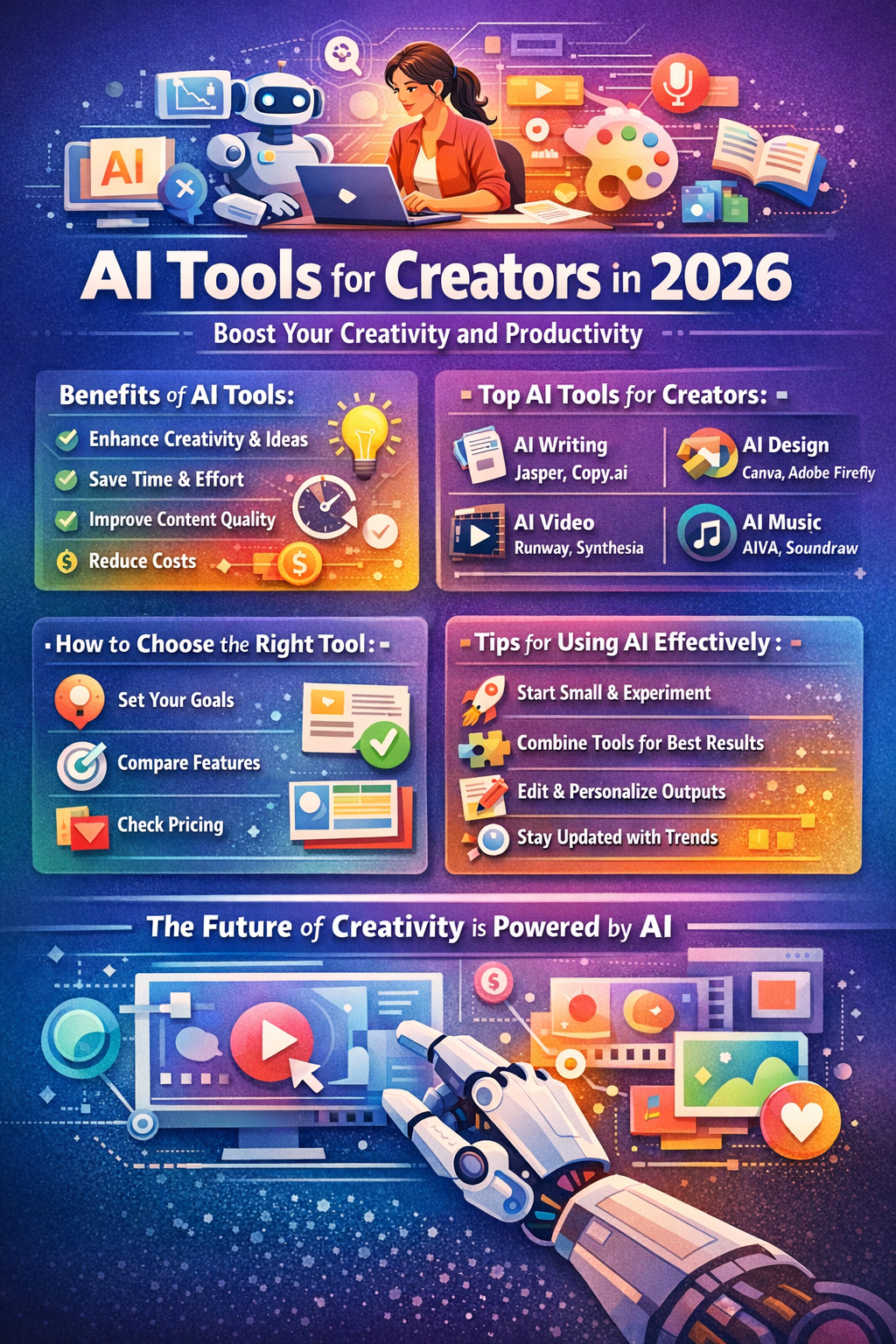
Introduction: Why AI Tools for Creators Are Essential in 2026
In today’s fast-paced digital world, creators face increasing pressure to produce high-quality content quickly. Whether you are a writer, designer, video editor, or musician, staying ahead of the competition requires more than just skill—it demands efficiency, creativity, and innovation. This is where AI tools for creators come into play.
AI, or artificial intelligence, is no longer a futuristic concept—it’s a practical technology that helps creators streamline their workflow, generate ideas, and enhance the quality of their work. From automating repetitive tasks to generating professional-grade designs, AI tools have transformed how creators approach content production.
Key benefits of AI tools for creators include:
- Enhanced Creativity: AI can suggest ideas, generate drafts, or provide inspiration for designs and content.
- Time Efficiency: Repetitive tasks such as editing, formatting, and basic design can be automated, freeing creators to focus on the creative process.
- Cost Savings: AI tools reduce the need for large teams or expensive software by providing accessible, affordable solutions.
- Professional Output: Even solo creators can produce work that rivals the quality of large creative agencies.
According to a report by MarketsandMarkets, the global AI in the creative industry market is projected to grow from $1.5 billion in 2023 to over $6 billion by 2028, highlighting the increasing adoption of AI tools by creators worldwide.http://openbygpt.com
In this guide, we’ll explore everything creators need to know about AI tools, including what they are, how they work, the top tools to use in 2026, tips for maximizing their effectiveness, and the future of AI in creative industries. Whether you’re a beginner or an experienced professional, this article will serve as a comprehensive resource to help you leverage AI for your creative projects.
What Are AI Tools for Creators?
AI tools for creators are software applications powered by artificial intelligence that help creative professionals streamline their work, generate ideas, and produce high-quality content efficiently. These tools leverage machine learning, natural language processing (NLP), and generative AI to perform tasks that traditionally required significant human effort. From writing articles to designing graphics and producing videos, AI tools are now indispensable in modern creative workflows.
Definition and Overview
At their core, AI tools for creators are designed to augment human creativity rather than replace it. They assist with tasks such as idea generation, content drafting, design suggestions, video editing, music composition, and workflow automation. By analyzing patterns, trends, and user input, these tools can provide recommendations, automate repetitive processes, and even create original content.
For example:
- AI writing tools like Jasper or ChatGPT can draft blog posts, social media content, or scripts.
- AI design tools like Canva AI and Adobe Firefly can generate professional visuals with minimal effort.
- AI video tools like Runway ML can automate editing or convert scripts into fully produced videos.
AI tools enable creators to work smarter, not harder, allowing them to focus on strategy, storytelling, and personal style while AI handles the repetitive or time-consuming parts of content creation.
Types of AI Tools Creators Use
There are several categories of AI tools, each tailored to different creative needs:
- AI Writing Tools – Assist in drafting content, generating ideas, proofreading, and even SEO optimization.
- AI Graphic Design Tools – Create images, logos, infographics, and social media visuals.
- AI Video and Animation Tools – Convert scripts into videos, automate editing, and add special effects.
- AI Music and Sound Tools – Compose music, enhance audio quality, and design sound effects.
- AI Productivity and Workflow Tools – Automate planning, task management, and collaboration.
These tools often integrate with existing platforms, making it easy for creators to adopt AI without changing their workflow entirely.
How AI Tools Work
AI tools rely on advanced technologies such as machine learning, deep learning, and natural language processing to understand input and generate outputs. Here’s a simplified explanation:
- Machine Learning (ML): Tools learn patterns from existing data (e.g., previous designs, writing styles, or music compositions).
- Generative AI: This type of AI creates new content based on patterns and prompts, such as generating images, videos, or text from scratch.
- Natural Language Processing (NLP): Used in writing and chatbot tools, NLP allows AI to understand and produce human-like language.
- Automation Algorithms: These handle repetitive tasks like resizing images, correcting grammar, or editing video sequences.
By combining these technologies, AI tools can assist creators at multiple stages of the creative process, from brainstorming and planning to final production and publishing.
Benefits of Using AI Tools for Creators
AI tools for creators are transforming the creative industry by providing tangible benefits that go beyond mere convenience. Whether you’re a solo content creator, part of a creative team, or running a digital agency, leveraging AI can help you produce higher-quality content faster, improve creativity, and optimize your workflow.
Here’s a detailed look at the key benefits:
Enhance Creativity and Idea Generation
One of the most significant advantages of AI tools for creators is their ability to spark creativity and generate ideas. Creative blocks are common among writers, designers, and video producers, and AI tools can serve as a source of inspiration.
- AI writing tools like Jasper or Copy.ai can suggest topic ideas, headlines, and even complete paragraphs based on a few keywords.
- AI design tools like Canva AI or Adobe Firefly can generate multiple variations of a design in seconds, helping creators explore new visual styles.
- Case Study: A small marketing agency reported that using AI tools to brainstorm social media campaigns increased their creative output by 50%, allowing them to pitch more ideas to clients without increasing team size.
Save Time and Increase Productivity
AI tools help creators work faster by automating repetitive or time-consuming tasks. Tasks such as formatting, editing, resizing images, or video trimming can be completed in a fraction of the time.
- Video editors can use tools like Runway ML to automatically remove background noise, cut footage, or generate captions.
- Writers can use AI proofreading tools to correct grammar, improve readability, and optimize for SEO.
- Stat: According to Forrester Research, creators using AI tools can save up to 30–40% of time on routine content production tasks.
Practical tip: Allocate AI tools for repetitive processes, leaving you more time for strategy, storytelling, and refining your unique creative voice.
Improve Quality of Work
AI tools can enhance the quality of content in ways that might require specialized skills or large teams. With AI, creators can produce professional-level work independently.
- AI design tools can automatically balance colors, suggest layouts, and generate high-resolution graphics.
- AI writing tools can optimize tone, style, and structure to match the intended audience.
- Example: Musicians can use AI composition tools like AIVA to create original scores, producing music that sounds professionally composed without years of training.
Fact: Businesses using AI for content creation report higher engagement rates—up to 20% more on social media posts—thanks to improved quality and relevance.
Cost Efficiency
For independent creators or small teams, AI tools can be cost-effective alternatives to hiring additional staff or purchasing expensive software licenses.
- A single AI tool can replace multiple roles, such as copywriting, video editing, and graphic design.
- AI subscriptions are often more affordable than professional software suites, making them accessible to creators with limited budgets.
Example: A freelance content creator reported that by switching to AI-powered content and design tools, they reduced monthly expenses by 40% while increasing output and client satisfaction.
Accessibility and Democratization of Creativity
AI tools for creators are lowering barriers to entry in creative industries:
- Beginners can produce professional-quality work without formal training.
- Small teams can compete with larger agencies using AI-assisted efficiency.
- Creators in remote locations can access the same tools and resources as those in metropolitan hubs.
Insight: This democratization is changing the creative landscape, allowing more voices and perspectives to flourish in digital content, design, and media production.
Top AI Tools for Creators in 2026
With the rapid evolution of AI, creators now have access to an extensive range of tools that can enhance every aspect of content creation. From writing and graphic design to video production and music composition, AI tools for creators are helping professionals and hobbyists alike work smarter and faster. Below is a comprehensive overview of the best AI tools creators should consider in 2026.
AI Writing Tools
AI writing tools are designed to assist creators in generating written content, brainstorming ideas, and optimizing text for readability and SEO. These tools are invaluable for bloggers, marketers, and content creators.
Top AI Writing Tools:
| Tool | Key Features | Best Use Cases |
|---|---|---|
| Jasper | AI-generated blog posts, social media captions, email drafts | Content marketing, blogs, ads |
| Copy.ai | Idea generation, tone adjustment, AI copywriting | Marketing campaigns, product descriptions |
| Writesonic | SEO-focused content generation, paraphrasing | Blog posts, landing pages, social content |
| ChatGPT | Custom content creation, conversational AI writing | Scripts, tutorials, creative writing |
Benefits:
- Saves time by generating drafts quickly
- Provides inspiration and creative prompts
- Ensures consistent tone and style
AI Graphic Design Tools
AI graphic design tools help creators produce high-quality visuals, from social media posts to professional marketing materials, with minimal effort. These tools often include templates, automated layouts, and design suggestions powered by AI.
Top AI Design Tools:
| Tool | Key Features | Best Use Cases |
|---|---|---|
| Canva AI | Automated templates, text-to-image, design suggestions | Social media, presentations, marketing visuals |
| Adobe Firefly | Generative AI for graphics, image enhancement | Branding, digital art, marketing campaigns |
| Fotor | AI photo editing, image upscaling, retouching | Photography, blog visuals, digital content |
Benefits:
- Reduce design time from hours to minutes
- Generate professional-quality visuals without design expertise
- Experiment with multiple design variations easily
AI Video Creation Tools
AI is revolutionizing video production, making it faster and more accessible for creators at every skill level. AI video tools can automate editing, add captions, and even create fully generated videos from scripts.
Top AI Video Tools:
| Tool | Key Features | Best Use Cases |
|---|---|---|
| Runway ML | Automated video editing, background removal, motion tracking | YouTube, marketing videos, short-form content |
| Pictory | Text-to-video, auto captions, video summarization | Social media, training videos, tutorials |
| Synthesia | AI avatars, text-to-speech video generation | Corporate presentations, e-learning, explainer videos |
Benefits:
- Reduce post-production time
- Make video content accessible to creators without advanced video skills
- Easily produce multilingual or AI-narrated videos
AI Music and Audio Tools
For musicians, podcasters, and audio creators, AI tools provide composition, audio enhancement, and sound design capabilities. These tools are perfect for producing original music or improving audio quality.
Top AI Music & Audio Tools:
| Tool | Key Features | Best Use Cases |
|---|---|---|
| AIVA | AI-composed music, orchestration | Film scores, YouTube content, podcasts |
| Soundraw | AI-generated music, mood-based composition | Background music, gaming content |
| LALAL.AI | AI audio separation, stem extraction | Music production, remixing, podcasts |
Benefits:
- Compose music without formal training
- Enhance audio quality quickly
- Generate unique, royalty-free tracks for content
AI Workflow and Productivity Tools
AI can also optimize the workflow and productivity of creators by automating planning, task management, and collaboration. These tools allow creators to focus more on producing content and less on administrative tasks.
Top AI Productivity Tools:
| Tool | Key Features | Best Use Cases |
|---|---|---|
| Notion AI | Task automation, note-taking, content drafting | Planning, content calendars, project management |
| ChatGPT | Custom workflows, AI assistance for research and writing | Brainstorming, knowledge management |
| Zapier AI | Workflow automation, app integration | Automating social media posting, notifications, multi-app workflows |
Benefits:
- Streamline repetitive tasks
- Improve team collaboration
- Reduce errors and missed deadlines
How to Choose the Right AI Tool for Your Needs
With so many AI tools for creators available in 2026, selecting the right one can feel overwhelming. Each tool offers unique features, pricing plans, and integrations, so understanding your specific needs and priorities is crucial. The following guide will help you choose the best AI tools for your creative workflow.
Identify Your Goals
Before selecting an AI tool, clarify your creative objectives:
- Content Creation Goals: Are you focusing on writing, design, video, music, or a combination?
- Workflow Needs: Do you want to automate repetitive tasks, generate ideas, or enhance output quality?
- Skill Level: Are you a beginner looking for user-friendly tools or an experienced creator seeking advanced features?
Tip: Make a list of tasks you want to streamline or enhance with AI. This ensures you select tools tailored to your workflow.
Compare Features
Once your goals are clear, evaluate AI tools based on their features:
- Ease of Use: Is the interface intuitive for beginners?
- Customization Options: Can you adjust style, tone, or design elements?
- Integration: Does the tool work with your existing software or platforms (e.g., WordPress, Canva, Adobe Suite)?
- Content Quality: Does the AI produce outputs that meet professional standards?
Example: Canva AI is ideal for beginners who need quick, professional visuals, while Adobe Firefly is better suited for experienced designers requiring detailed customization.
Pricing and Budget Considerations
Pricing is an important factor when selecting AI tools for creators. Options range from free tools to subscription-based platforms:
- Free Tools: Basic functionality with limited output, ideal for experimentation.
- Subscription Plans: Offer premium features, higher output limits, and commercial licenses.
- Pay-Per-Use: Suitable for occasional projects without monthly commitments.
Fact: Many creators find that investing in a paid AI tool pays off by saving hours of work and increasing productivity. For instance, a content marketer reported that a $30/month AI writing subscription reduced their content creation time by 50%.
Compatibility and Integration
A tool’s ability to integrate with your existing workflow is critical:
- Cross-Platform Compatibility: Does the tool work on desktop, mobile, or web platforms?
- Team Collaboration: Can multiple users collaborate in real time?
- Automation Support: Does it integrate with apps like Zapier, Slack, or Trello for workflow automation?
Tip: Prioritize tools that fit seamlessly into your current setup to avoid unnecessary complexity.
Trial and Testing
Before committing, always test AI tools:
- Use free trials or demo versions to evaluate performance.
- Compare multiple tools for quality, speed, and ease of use.
- Track output quality and workflow improvements to make a data-driven decision.
Pro Tip: Many creators combine multiple AI tools for different purposes—e.g., one for writing, another for design, and a third for video—to maximize efficiency and output quality.